
Packages

Figure 240. Why packages ? Slide presentation
  • Grouping of related classes (e.g. subsystems).

  • Structuring big systems.

  • Provide access restrictions using:

    public, private and protected modifier

  • Resolving class name clashes. Example:

    java.lang.String vs. my.personal.String


Figure 241. Rules and conventions Slide presentation
  • Package names below java. are reserved.

  • Package names should not start with javax. either.

  • Package names must not contain operators:

    mi.hdm-stuttgart.de → de.hdm_stuttgart.mi.

  • Packages should start with reversed DNS avoiding clashes.


Figure 242. Fully qualified class name vs. import Slide presentation

Fully qualified class name:

java.util.Scanner ❶ scanner =          // Clumsy and
   new java.util.Scanner ❷(System.in); // redundant

Using import :

import java.util.Scanner; ❶

public class Q {

  static void main() {
     Scanner ❷ scanner = new Scanner ❷(System.in);
       ...
  }
}
Fully qualified class name Using import

❶

Using the fully qualified class i.e. including its package name name for defining a variable.

❷

Creating an instance by using the fully qualified class name again.

❶

Importing the Scanner class once.

❷

Unqualified class use due to import.


Figure 243. Don't be too lazy! Slide presentation
Bad Good
import java.util.*;

public class Q {
  static void
        main() {
    Scanner s = 
      new Scanner(System.in);
    Date today = new Date();
  }
}
import java.util.Scanner;
import java.util.Date;

public class Q {
  static void
         main() {
    Scanner s =
       new Scanner(System.in);
    Date today = new Date();
  }
}

Figure 244. Special: Classes in package java.lang Slide presentation
import java.lang.String; ❶  // Optional
import java.util.Scanner;❷  // Required
public class Q {

  static void main() {
    String message = "Hello!";
    Scanner ❸ s = new Scanner(System.in);
  }
}
❶

Classes belonging to the java.lang package are being imported automatically.

❷

The Scanner class belongs to the java.util package and must thus be imported.

❸

Without the import java.util.Scanner statement we need the fully qualified class name:

java.util.Scanner s = new java.util.Scanner(System.in);

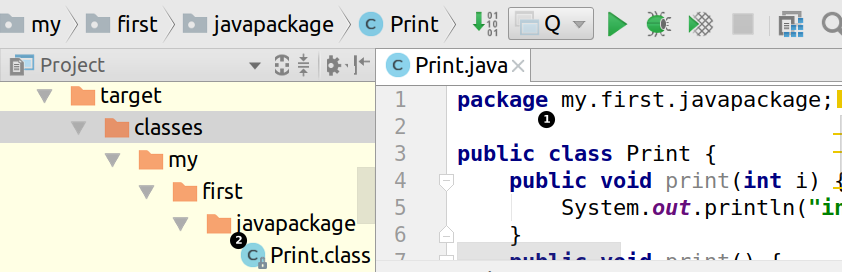
Figure 245. Class, package and file system Slide presentation
Class, package and file system

❶

A class Print defined in package my.first.javapackage.

❷

Generated byte code in corresponding directory hierarchy.


Figure 246. Source hierarchy view Slide presentation
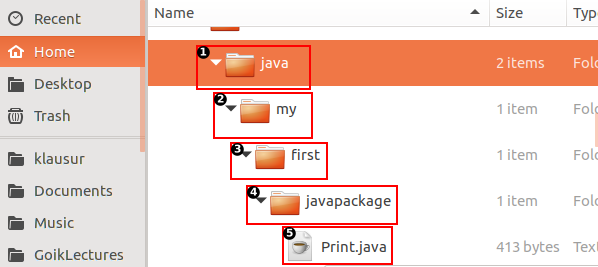
Source hierarchy view
package my.first.javapackage;
        ❷ ❸     ❹
public class Print { 
              ❺
  ...


}

❶

Our project's start folder containing Java™ classes.

❷

First package name component.

❸

Second package name component.

❹

Third package name component.

❺

Class Print being contained within our package.