
Shared development with centralized remote.

-
Create empty remote repository on
gitlab.mi.hdm-stuttgart.de. -
Connect local repository to remote
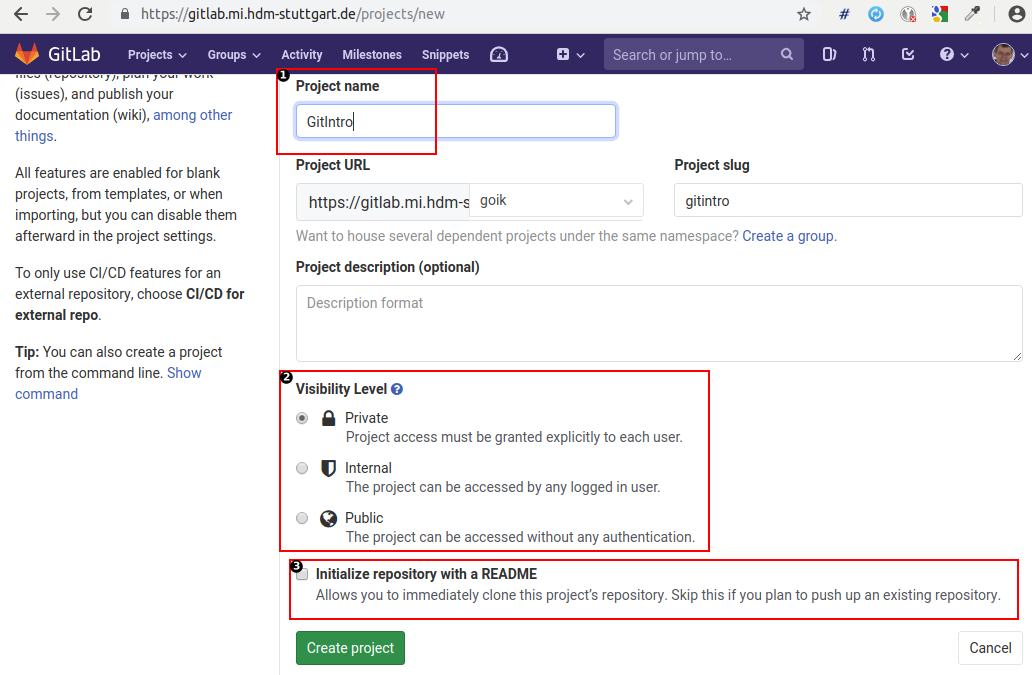
|
❶ |
Each project requires a unique but otherwise arbitrary name within the git repository server. |
|
❷ |
You decide about your project's general visibility. This default restriction does not apply for project members being added subsequently. |
|
❸ |
As the hint states: Leave this project empty for being able to push your content later. |
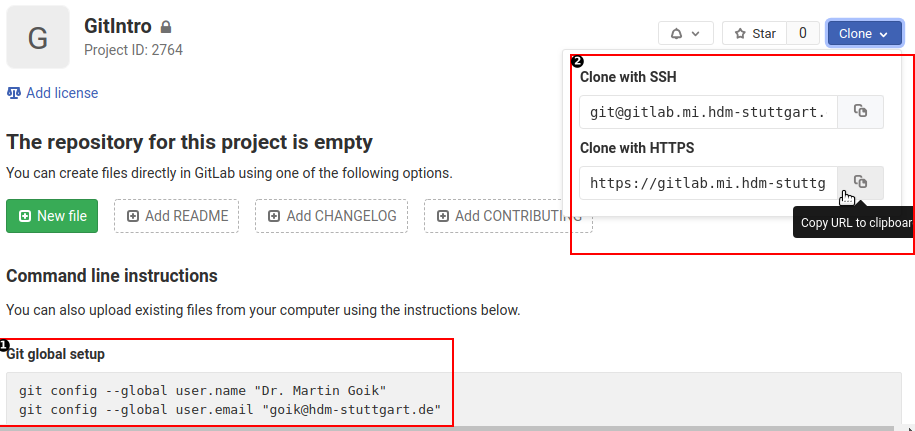
|
❶ |
These settings must be applied at your local project's side. They are being required for later identification of individual project member commits. |
|
❷ |
Depending on your personal choice two protocols for connecting your project are on offer:
|
git push --set-upstream origin ❶ master
Username for 'https://gitlab.mi.hdm-stuttgart.de': goik ❷
Password for 'https://goik@gitlab.mi.hdm-stuttgart.de':
Counting objects: 5, done.
Delta compression using up to 6 threads.
Compressing objects: 100% (4/4), done.
Writing objects: 100% (5/5), 507 bytes | 507.00 KiB/s, done.
Total 5 (delta 0), reused 0 (delta 0)
To https://gitlab.mi.hdm-stuttgart.de/goik/gitintro.git
 * [new branch]      master -> master ❸
Branch 'master' set up to track remote branch 'master' from 'origin'.
> git pull ❶
Username for 'https://gitlab.mi.hdm-stuttgart.de': goik ❷
Password for 'https://goik@gitlab.mi.hdm-stuttgart.de':
remote: Enumerating objects: 8, done.
remote: Counting objects: 100% (8/8), done.
remote: Compressing objects: 100% (6/6), done.
remote: Total 6 (delta 1), reused 0 (delta 0)
Unpacking objects: 100% (6/6), done.
From https://gitlab.mi.hdm-stuttgart.de/goik/gitintro ❸
   733e541..ffff092  master     -> origin/master
Updating 733e541..ffff092 ❹
Fast-forward
 Math.java | 10 ++++++++-- ❺
 1 file changed, 8 insertions(+), 2 deletions(-)
|
Replace local repository by remote repository. |
|
|
User credentials. |
|
|
Log info: Local master branch has been replaced by remote master branch |
|
|
Log info: Switch to topmost (HEAD) remote repository commit: >git log commit ffff092c51324efad06f0639191f1372ba98e9f8 (HEAD -> master, origin/master) Author: Martin Goik <goik@hdm-stuttgart.de> Date: Sun May 26 10:41:22 2019 +0200 Adding method commentAdding method comment commit 733e541a3c3daa19e789f80c6174f19417b2247e Author: Martin Goik <goik@hdm-stuttgart.de> Date: Sat May 25 17:59:46 2019 +0200 ... |
|
|
Change related statistics. |
-
Create new possibly non-empty project at https://gitlab.mi.hdm-stuttgart.de.
> git clone https://gitlab.mi.hdm-stuttgart.de/goik/gitintro.git
Cloning into 'gitintro'...
Username for 'https://gitlab.mi.hdm-stuttgart.de': goik
Password for 'https://goik@gitlab.mi.hdm-stuttgart.de':
remote: Enumerating objects: 5, done.
remote: Counting objects: 100% (5/5), done.
remote: Compressing objects: 100% (4/4), done.
remote: Total 5 (delta 0), reused 0 (delta 0)
Unpacking objects: 100% (5/5), done.
