if-then-else

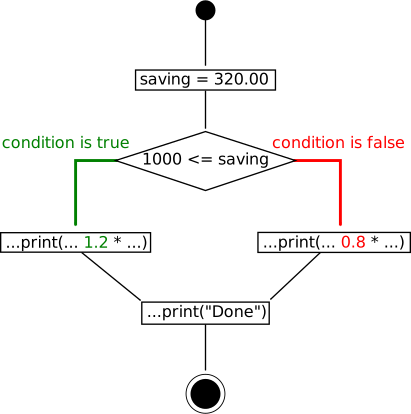
Figure 158. if ... else Slide presentation
double saving = 320.00;

if (1000 <= saving ❶)  { ❷
  
  IO.println(
     "Interest:" + 1.2 * saving / 100);        
} ❸ else { ❹
  
  IO.println(
    "Interest:" + 0.8 * saving / 100);
}
IO.println("Done!");
Interest:2.56
Done!
if ... else

❶

Decision on boolean expression.

❷

Conditional execution of on block or single statement.

❸

Required branch being executed in case of boolean expression being true.

❹

Optional branch corresponding to boolean expression being false.


Figure 159. if ... else syntax Slide presentation
if (booleanExpression)
   (block | statement)
[else
   (block | statement) ] ❶

❶

The “[...]” pair of braces denotes an optional clause that may or may not be present.

Thus only the first part “if (booleanExpression) (block | statement)” is mandatory.


Figure 160. Best practices comparing for equality Slide presentation

Use

if (4 == variable) ...

in favour of:

if (variable == 4) ... ❶

❶

Some programming languages allow for interpreting integer values as logical expressions. In »C / C++« for example an int value of zero is equivalent to false and nonzero values evaluate to true. Consider the following snippet:

if (variable = 4) {...} /* Just a single "=" rather then "==" */

A Java™ compiler will flag this as a compile time error. On contrary in »C / C++« this is perfectly correct code: The term variable = 4 having a nonzero value of 4 evaluates to true which in real code would most likely be a bug. Subject to choosing compiler warning options the possible damage may be mitigated depending on the observer's degree of pedantry.

Changing the order however even in »C / C++« results in a compile time error since we cannot assign a value to a literal:

if (4 = variable) {...} // Compile time error, even in C/C++

We are thus able to avoid this type of error in the first place.


exercise No. 59

Providing better display

Q:

We reconsider Working with variables :

Source code Output
int a = -4,
    b = 100;

IO.println(a + "+" + b+ "=" + (a + b));
-4+100=96

Unfortunately a negative value yields:

Source code Output
int a = 100,
    b = -4;

IO.println(a + "+" + b + "=" + (a + b));
100+-4=96

This result looks awkward. Modify the code to see 100-4=96 in such cases. You may reconsider the findings from Why using braces in IO.println(...) ? .

A:

The following simple solution does not work:

Source code Output
int a = 100,
    b = -4;

if (b < 0) {
   IO.println(a + b + "=" + (a + b));
} else {
   IO.println(a + "+" + b + "=" + (a + b));
}
96=96

Since a and b are both variables of type int they get added rather than string concatenated:

IO.println(a  +   b +  "=" + (a + b));
             ↘  ↙      ↙        ↘ ↙ 
              96     ↙          96
                ↘  ↙          ↙ 
                "96="       ↙ 
                   ↘      ↙ 
                   "96=96"

Resolving this issue may be effected by adding an empty string ❶ turning our int variable a into a String:

int a = 3:
String s = a + ""❶;

This allows for left to right string concatenation:

IO.println(a + ""❶ + b + "=" + (a + b));
            ↘ ↙      ↙            ↘ ↙ 
            "100"  ↙              96
               ↘ ↙               ↙ 
            "100-4"            ↙ 
                   ↘         ↙ 
                   "100-4=96"
Source code Output
int a = 100,
    b = -4;

if (b < 0) {
    IO.println(a + ""  + b + "=" + (a + b));
  } else {
    IO.println(a + "+" + b + "=" + (a + b));
}
100-4=96

We may as well do this conversion explicitly:

int a = 100,
    b = -4;

if (b < 0) {
    IO.println(Integer.toString(a) + ""  + b + "=" + (a + b));
  } else {
    IO.println(a + "+" + b + "=" + (a + b));
}

exercise No. 60

Comparing for equality

Q:

Copy the following snippet into your IDE:

int count = 1;

if (count = 4) { // is count equal to 4?
  IO.println("count is o.K.");
}

The Java™ compiler will indicate an error:

Incompatible types.
Required: boolean
Found: int

Explain its cause in detail by examining the count = 4 expression.

Tip

Java™ provides two similar looking operators = and == having (totally) different semantics.

A:

The two operators = and == are completely unrelated:

Operator “=” :

The assignment operator. A typical statement reads a = 34 assigning 34 to the variable a.

Note this operator's semantics being completely different from even elementary math syntax. Consider:

x = y ⇒ x 2 = y 2

In math “=” denotes the equality of objects, e.g. values, sets, functions and so on.

Operator “==” :

The comparison operator matching the usual math “comparing” semantics :

  • Java™ primitive types for equality of value.

  • Java™ objects for identity.

In particular, an expression like count == 4 is of type boolean being either true or false.

More formally the expression count = 4 is of type int evaluating to 4 (surprise!). However an if (...) operates on boolean values only and if(4) thus does not make sense at all in Java™. The code in question may therefore be re-written as:

int count = 1;

int countAssignment = (count = 4); // Assigning expression count = 4 to variable countAssignment.

if (countAssignment) { // Error: An int is not a boolean!
  IO.println("count is o.K.");
}

Since the assignment operator is being evaluated from right to left we actually do not need braces:

...
// Assigning expression count = 4
// to variable countAssignment.

int countAssignment = count = 4; 
...

This code is equivalent to its counterpart with respect to compilation. The comment “is count equal to 4?” is thus misleading: The intended comparison requires using the “==” operator rather than the assignment operator “=”. Changing it the resulting expression is indeed of type boolean:

int count = 4 + 3;
final boolean test = (count == 4); // Now using "==" (comparison) in favour of "=" (assignment)
IO.println("test=" + test);

Again we may omit braces here due to operator priority rules:

...
final boolean test = count == 4; // Now using "==" (comparison) in favour of "=" (assignment)
...

The boolean variable test will receive a value of false as expected. Thus our initial code just needs a tiny modification replacing the assignment operator «=» by the comparison operator «==»:

int count = 1;

if (count == 4) { // is count equal to 4?
  IO.println("count is o.K.");
}

Note

In contrast to Java™ some programming languages like C and C++ allow for integer values in if (...) conditionals:

#include <stdio.h>

int main(int argc, char **args) {

  int a = 3;
  if (a = 4) {
     printf("a has got a value of 4\n");
  }
}

The integer expression count = 4 has got a value of 4. Integer values inside an if (...) statement will be evaluated as:

true

if the expression's value differs from zero

false

if the expression's value equals zero

Thus in C and C++ the expression if(count = 4) will always evaluate to true irrespective of the variable count's initial value. Most important: The C compiler will not issue an error or warning unless non-default, more restrictive compile time warning options are being activated. Consider this widely used «feature» to be dangerous at best.

For this reason it is good practice always using if (4 == count) rather than if (count == 4): Even in C you cannot assign a value to a constant literal. Thus an accidentally mistyped if (4 = count) statement will definitively result in a compile time error most likely saving its author from tedious debugging.

Figure 161. Single statement branches Slide presentation

Branches containing exactly one statement don't require a block definition.

double initialAmount = 3200;

if (100000 <= initialAmount)
  IO.println("Interest:" + 1.2 * initialAmount / 100);
else if (1000 <= initialAmount)
  IO.println("Interest:" + 0.8 * initialAmount / 100);
else
  IO.println("Interest:" + 0);

Note: It's a good practice adding braces anyway.


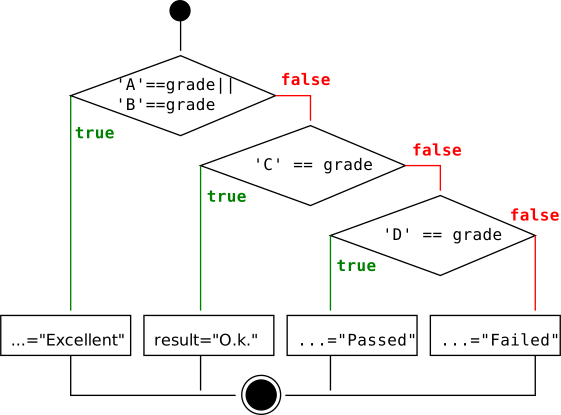
Figure 162. Nested if ... else Slide presentation
if ('A' == grade || 'B' == grade) {      
   result = "Excellent";
} else {
   if ('C' == grade) {
      result = "O.k.";
   } else {
      if ('D' == grade) {
         result = "Passed";
      } else {
         result = "Failed";
      }
   }
}
Nested if ... else