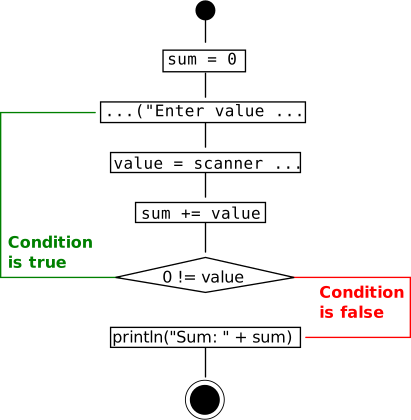
do ... while

Figure 179. A do ... while loop Slide presentation
int sum = 0, value;
do {
  IO.print(
   "Enter value, 0 to terminate: ");  
  value = scan.nextInt();
  sum += value;
} while (0 != value);
IO.println("Sum: " + sum);
Enter value, 0 to terminate: 3
Enter value, 0 to terminate: 1
Enter value, 0 to terminate: 0
Sum: 4
A do ... while loop


Figure 180. do ... while vs. while Slide presentation
while loop:

Termination condition being checked before possible first loop execution.

Remark: Depending on its termination condition a while loop may not be entered at all.

do ... while loop:

Termination condition being checked after first loop execution.

Remark: A do ... while loop is being entered at least once.


Figure 181. do ... while syntax Slide presentation
do
  (block | statement)
while (booleanExpression);


exercise No. 73

Even or odd?

Q:

Write an application which asks for integer values telling its user whether a given value is even or odd. Providing the special value 0 shall terminate your application:

Enter an integer (0 to terminate): 77
    77 is an odd number
Enter an integer (0 to terminate): -3
    -3 is an odd number
Enter an integer (0 to terminate): 26
    26 is an even number
Enter an integer (0 to terminate): 0
    0 is an even number
Goodbye!

Tip

  1. Use the modulo % operator.

  2. Choose an appropriate loop type with respect to your application's termination on user input «0».

A:

We obviously need a loop to ask for further input unless the last entered value was 0. In any case the loop's statement will be executed at least once:

Enter an integer (0 to terminate): 0
    0 is an even number
Goodbye!

A do ... while(...) rather than a while(...) loop is thus appropriate. It allows for entering the loop's body before any check is about to happen:

final Scanner scanner = new Scanner(System.in));

  int userInput;
    do {
      IO.print("Enter an integer (0 to terminate): ");
      userInput = scanner.nextInt();
      if (0 == userInput % 2) {
        IO.println("    " + userInput + " is an even number");
      } else {
        IO.println("    " + userInput + " is an odd number");
      }
    } while (0 != userInput);
  IO.println("Goodbye!");
}

exercise No. 74

Square root approximation

Q:

Derived from the Newton–Raphson method we can approximate a given value a 's square root a by the following recursively defined series:

Start:
x 0 = a 2
Recursion step:
x n + 1 = 1 2 ( x n + a x n )

Implement the following method sqrt(...) for calculating a given value's square root:

/**
 * Calculates the square root of a number.
 * @param radicand The vradicandand.
 * @return The square root of radicand.
 */
double sqrt(double radicand) {

    return ...;
}

Tip

Due to the limited precision of machine arithmetics you may continue until your approximation value no longer changes.

Then test your implementation by e.g.:

final Scanner scan = new Scanner(System.in);

IO.print("Enter a non-negative value: ");
final double input = scan.nextDouble();

IO.println("The square root of " + input + " is close to " + sqrt(input));
IO.println("It's square is " + sqrt(input) * sqrt(input));
Enter a non-negative value: 2.0
The square root of 2.0 is close to 1.414213562373095
It's square is 1.9999999999999996

The difference appearing here is inevitable due to limited precision when dealing with double values.

A:

We introduce two variables x_current and x_next referring to x n and x n + 1 respectively:

double sqrt(double radicand) {
    double x_next = radicand / 2, x_current;

    do {
        x_current = x_next;                          // Save current approximation value
        x_next = (x_current + radicand / x_current) / 2;    // Calculate next series value
    } while (x_next != x_current);                 // Did we get any closer?
    return x_current;
}